


Flōd
2026
UX Research & UI Design
Project Overview
When the road you trust is the one that closes first.
McGraths Hill's main evacuation road is cut off before floodwater reaches most homes. Our team proposed a community centre and an app to help residents know when to leave, where to go and what to do next. This case study covers the app.
Flōd is one part of a wider flood-resilience proposal concept for McGraths Hill by a four-person studio team: the Water Garden, a community centre that serves residents every day and becomes a safe refuge in a flood, with its refuge levels built above flood height and a rain garden outside that holds and filters runoff, plus physical infrastructure for emergencies, and a digital app. I led the UI workstream, scoping the screens and content and co-designing them with a teammate, and I created a survey of 18 people who had experienced floods.
The Evidence
A suburb that becomes an island.
Windsor Road, the main way out, is cut long before the water reaches most homes.
Windsor Road is effectively cut at 13.5 m. Many homes in McGraths Hill have main living floors approved at about 16 m, and a 1-in-100-year flood reaches about 17.3 m at the road's low point. In that flood, the suburb is completely submerged and the evacuation routes are cut.
13.5 m
road cut-off by water level
75 hrs
typical isolation in a 1-in-100-year flood
3 of 18
felt their warning was early enough.
Source: 13.5 m and 75 hrs: WMAwater (2025), Hawkesbury Floodplain Risk Management Study and Plan 2025, Final Report, pp. 31 to 32 (Tables 11 and 12). 3 of 18: Flōd studio survey of people who had experienced flooding.
Data note: 13.5 m is the Windsor Road low point near McGraths Hill (mAHD). 75 hrs is the typical inundation time in a 1-in-100-year flood and can vary by about 24 hours either way. The survey was small and not limited to McGraths Hill residents, so it shows patterns, not community-wide results.
Understanding the Problem
What residents told us.
I surveyed 18 people who had lived through a flood. The warnings reached them, but not early or clearly enough to act on.
Survey Participant
“I wish I had clearer local information about when to leave, which roads were safe, where to go, and how serious the risk was for my exact area.”
Only 3 said their warning came early enough, and 11 said “somewhat.” Just 2 found the information clear and helpful, and 10 only partly knew what to do. Neighbours were the most common first source of warning (8 of 18), and most described them helping, though a few were on their own.
Was the warning early enough?
Yes
Somewhat
No
No warning
Survey of 18 respondents. Directional, not representative
Design Response
Three things the app had to solve.
The research gave a clear brief: show what is happening on my street, where to go and what to do next.
01 / A warning people can act on
Provide timely, location-specific flood information in language residents can understand.
02 / A familiar place to go
Connect residents with the proposed Water Garden Centre, a community space designed to be familiar before an emergency occurs.
03 / Guidance for what comes next
Make preparation and response steps clear, so residents aren't left interpreting flood data on their own.
The Design
Clear enough to act on.
The app is for moments when things change fast, so every screen puts the next step first.
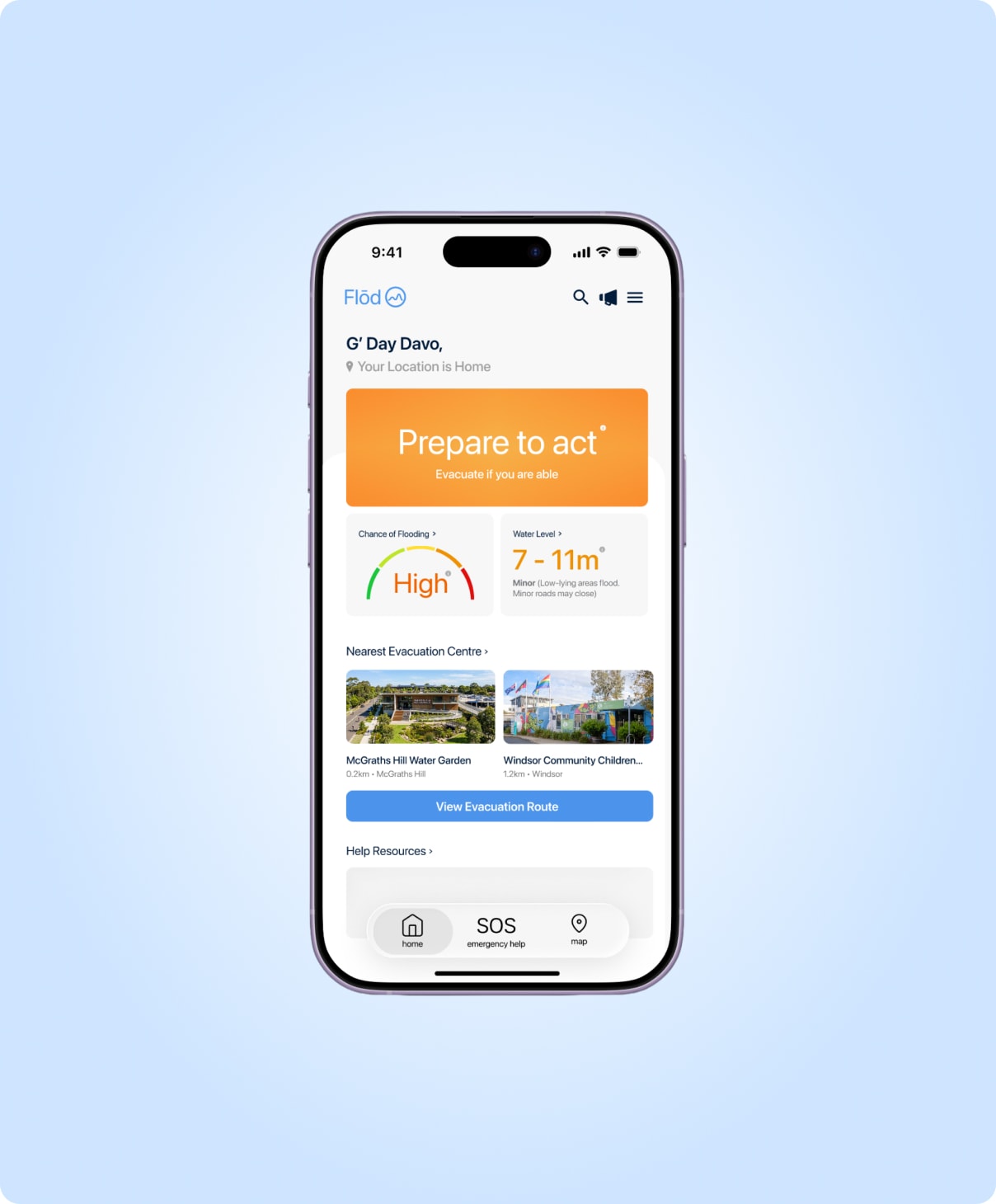
The dashboard opens with “Prepare to act” before any numbers, then shows the chance of flooding, a plain-language water level and the nearest evacuation centres. The map concept shows a route that avoids flooded roads and a warning that names the closure. SOS stays one tap away in the bottom navigation.
These are designed concepts: live data, routing and emergency links would need to be built and tested.
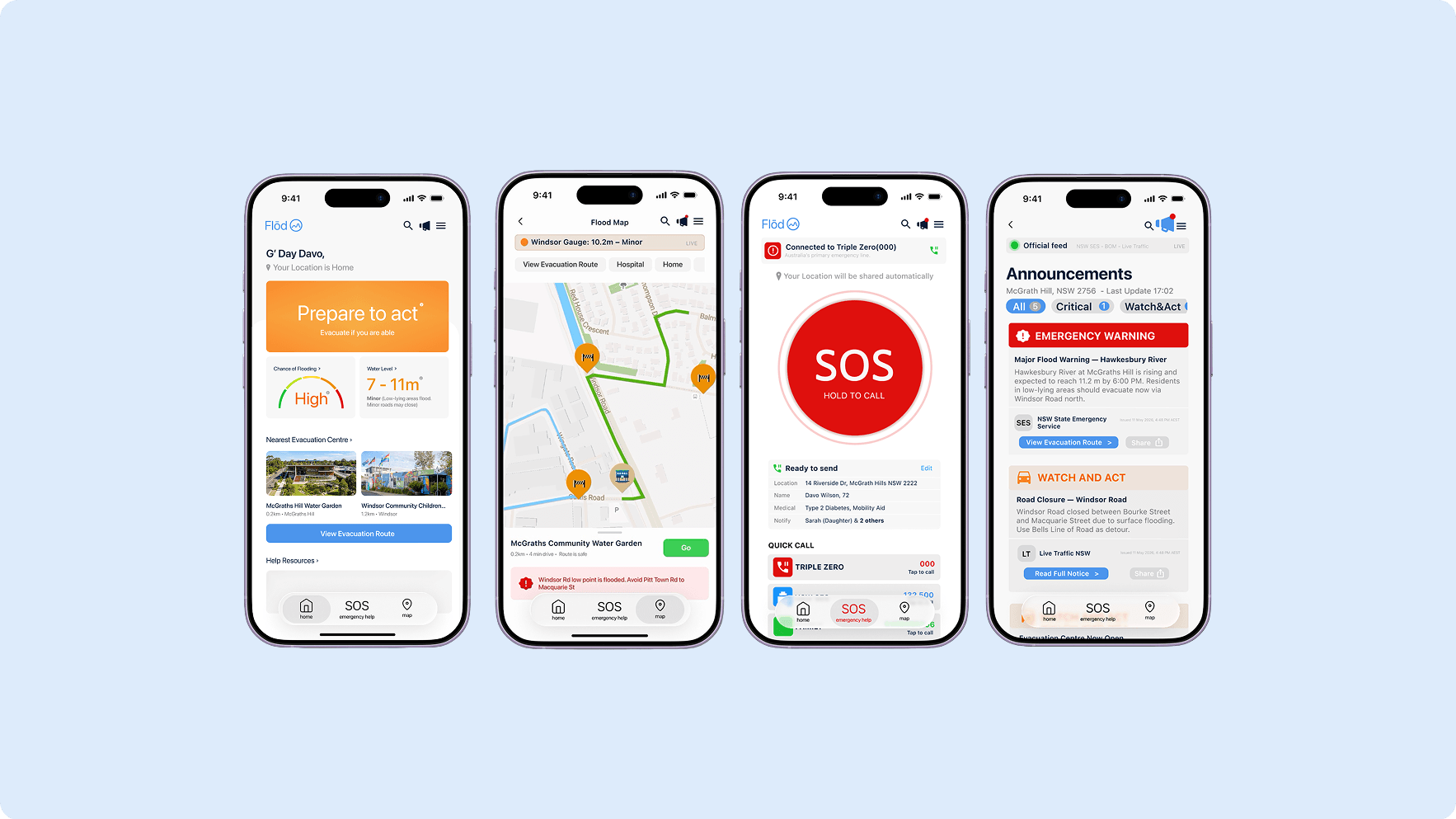
Final app screens (concept, with placeholder data). Home and Map designed by me, SOS and Announcements by Xingyuan Fang.
Why it's designed this way
- “Prepare to act” before any numbers. Only 6 of 18 clearly knew what to do, so the instruction comes first.
- A plain-language water level (“Minor: low-lying areas flood, minor roads may close”). Heights in metres mean little to residents, and only 2 of 18 found the information clearly helpful.
- A map concept that names the closure. Windsor Road is cut at 13.5 m, so people need to know which road is the problem.
- The Water Garden as the first destination (0.2 km on the dashboard), so the decision of where to go is already made before the water rises.
- SOS always in the bottom navigation, because help should never be behind a menu when you're stressed.
How It Changed
From data first to action first.
My low-fidelity wireframe led with the numbers. The final leads with what to do.
My low-fi dashboard opened with the temperature, flood chance and a water level number. In the final, the first thing you see is “Prepare to act,” with the numbers beneath in plain language, because the survey showed people got warnings but didn't know what to do.
Our first instinct for the project was technical, with sensors and smart infrastructure. The research showed technology alone couldn't close the gap, so we designed for what formal systems miss: plain-language guidance and a place people already know.
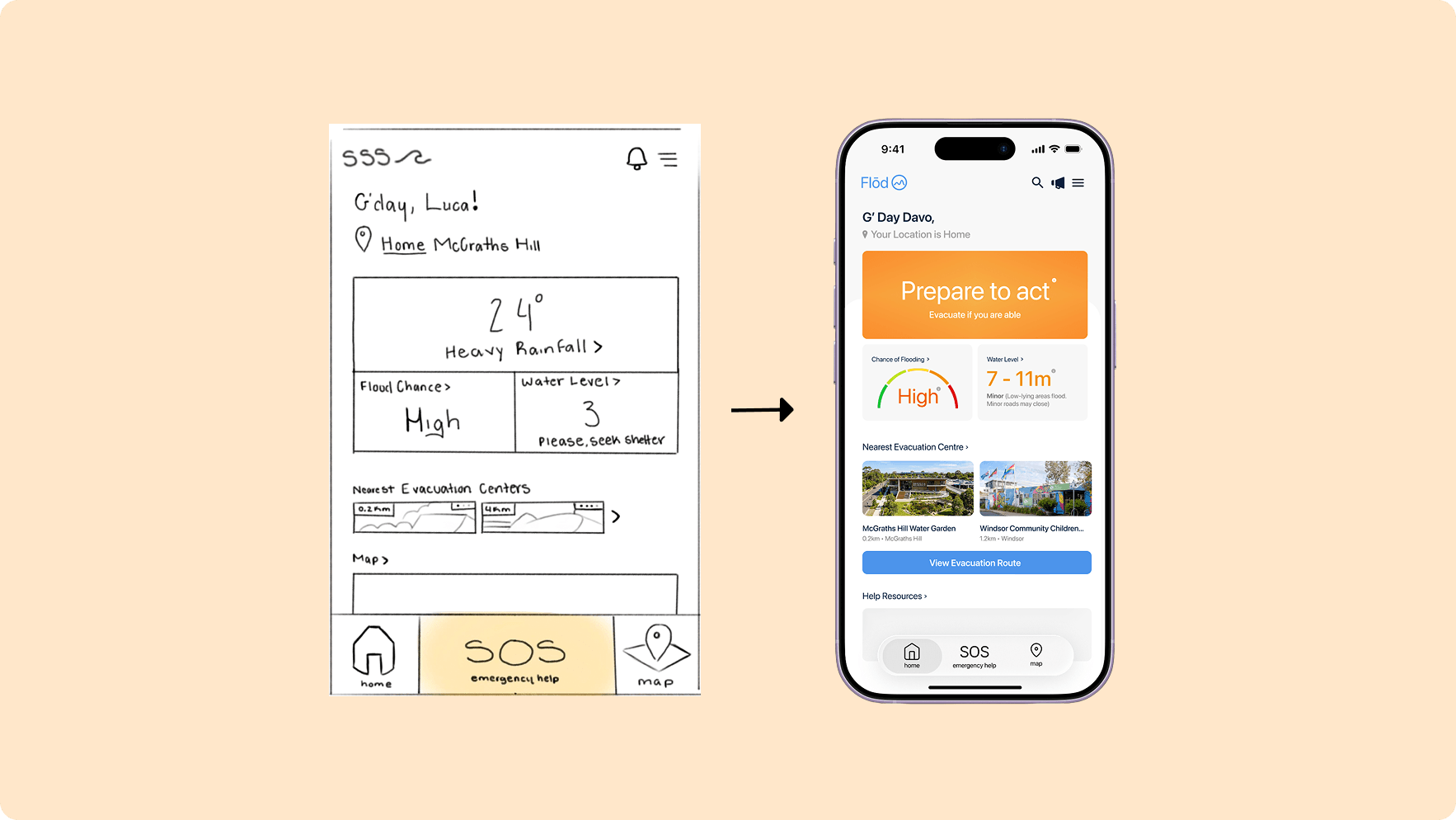
“Prepare to act” comes before the data. · The map concept hides flooded roads. · SOS is always one tap away.
Next Steps
Designed to be tested.
This is a studio proof of concept, and the next step is putting it in front of the people it's for.
I'd test the screens with residents and the SES, check the status colours for contrast in bright sun, and settle who runs the centre in an emergency, including whether the SES could use it as a rescue hub. We also named the risks: over-trust that delays leaving, people without smartphones being left out, and location privacy. A printed guide is part of the answer to the digital gap.
The other half: the Water Garden. Day to day it's a community space. Its upper levels sit above the flood stages so it can serve as a refuge, and the rain garden outside collects and slows rainwater. The proposal assumed around $80,000, a proposed budget and not funding we received.
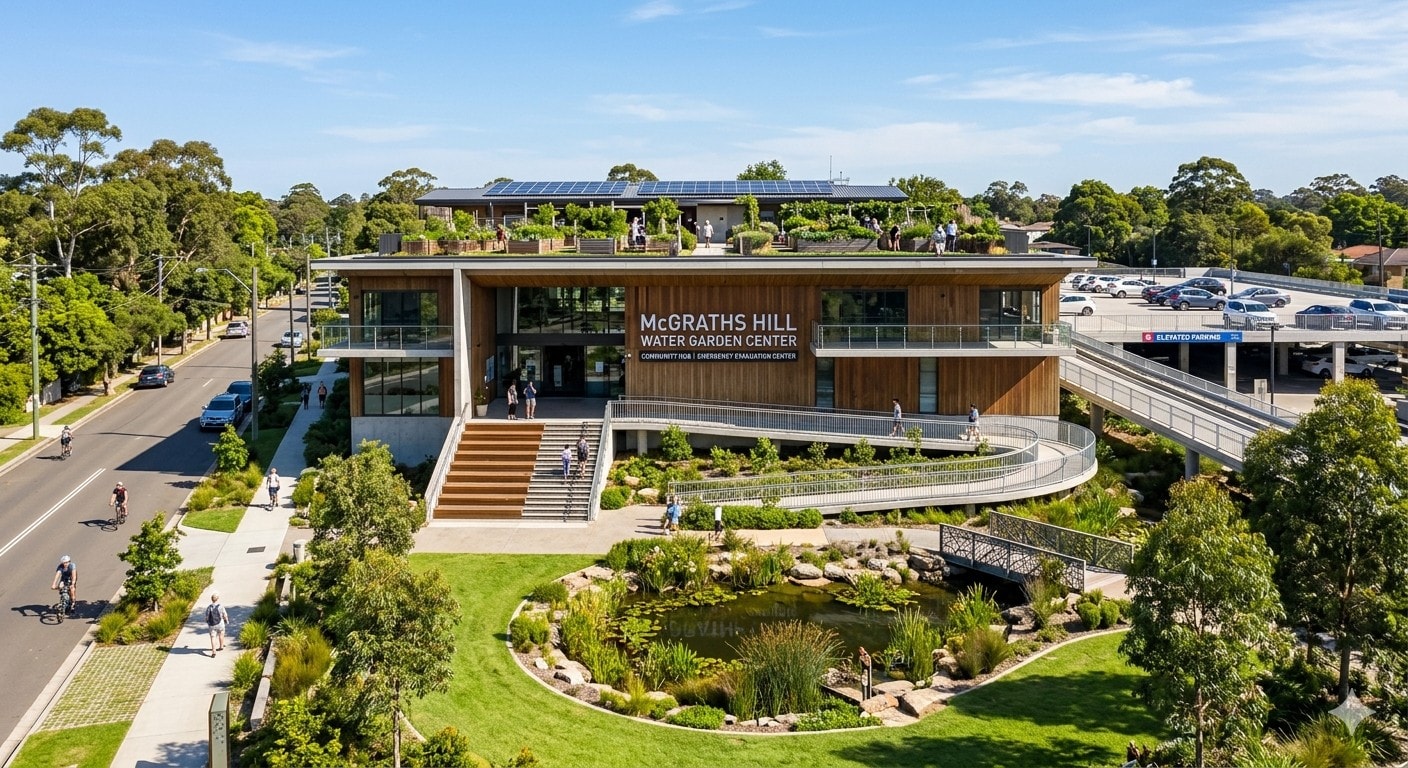
AI-generated concept image of the McGraths Hill Water Garden. Illustrative only.
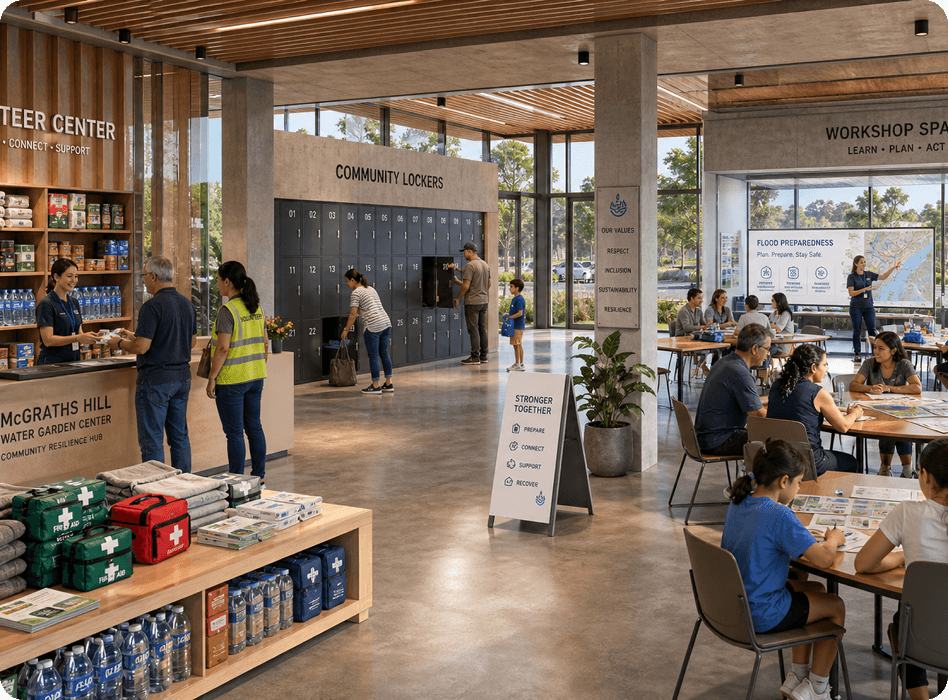
AI-generated concept interiors. Illustrative only.
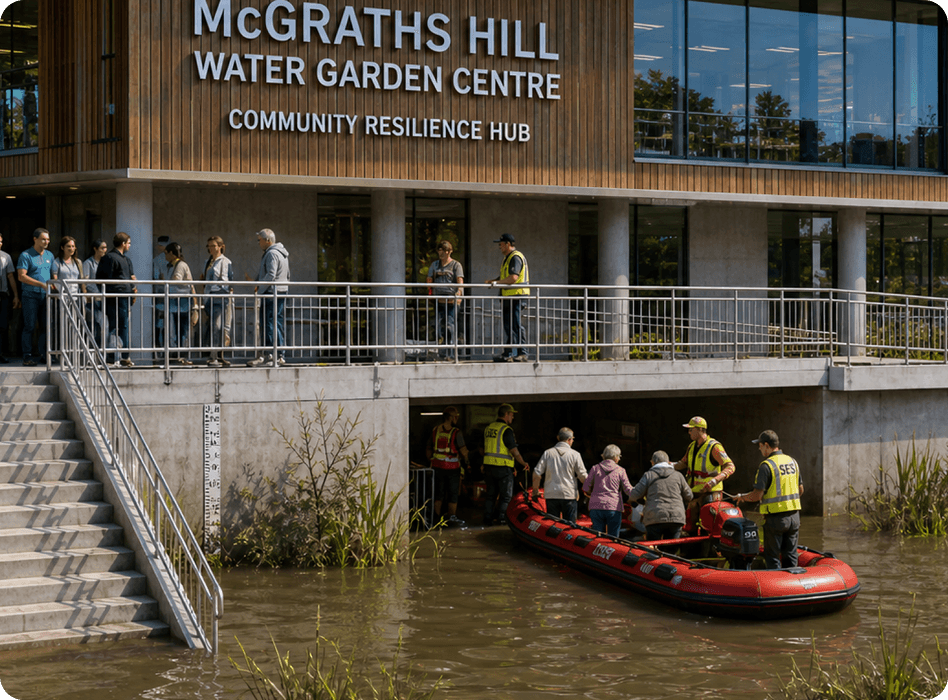
AI-generated concept image. A potential idea: in a major flood, the Water Garden's raised levels could serve as a hub for SES rescue efforts. Illustrative only, not validated with the SES.